
Nissan Maxima Service and Repair Manual: Symptom diagnosis
NOISE, VIBRATION AND HARSHNESS (NVH) TROUBLESHOOTING
NVH Troubleshooting Chart
Use the chart below to help you find the cause of the symptom. If necessary, repair or replace these parts
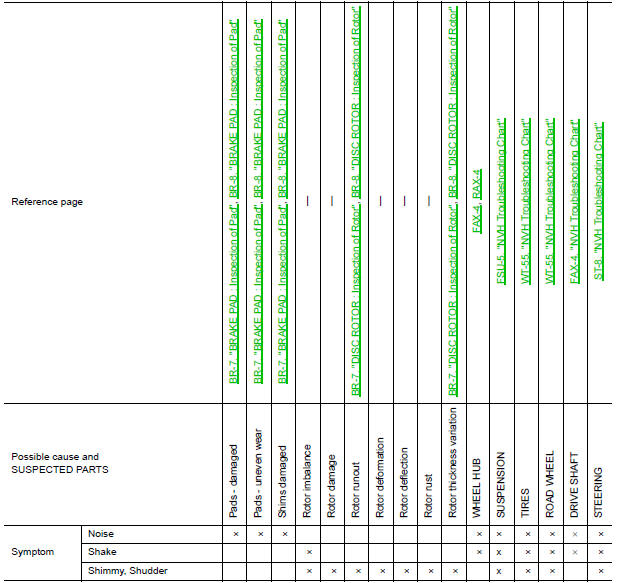
×: Applicable
 Preparation
Special Service Tool
The actual shapes of the tools may differ from those illustrated here.
Commercial Service Tool
...
 Basic inspection
...
Other materials:
Front door speaker
Description
The AV control unit sends audio signals to the BOSE speaker amp. The BOSE
speaker amp. amplifies the
audio signals before sending them to the front door speakers using the audio
signal circuits.
Diagnosis Procedure
1.CONNECTOR CHECK
Check the AV control unit, BOSE speaker amp. ...
Diagnosis system (AV control unit)
Description
The AV control unit diagnosis function starts up with multifunction
switch operation and the AV control unit
performs a diagnosis for each unit in the system during the on board
diagnosis.
Perform a CONSULT diagnosis if the on board diagnosis does not start,
e.g., the s ...
B2116 tilt motor
Description
The tilt motor is installed to the steering column assembly.
The tilt motor is activated with the automatic drive positioner control
unit.
The steering column is tilted up/down by changing the rotation direction
tilt motor.
DTC Logic
DTC DETECTION LOGIC
DTC No.
...
Nissan Maxima Owners Manual
- Illustrated table of contents
- Safety-Seats, seat belts and supplemental restraint system
- Instruments and controls
- Pre-driving checks and adjustments
- Monitor, climate, audio, phone and voice recognition systems
- Starting and driving
- In case of emergency
- Appearance and care
- Do-it-yourself
- Maintenance and schedules
- Technical and consumer information
Nissan Maxima Service and Repair Manual

0.0089