
Nissan Maxima Service and Repair Manual: Rear disc brake
BRAKE PAD
BRAKE PAD : Inspection of Pad
PAD WEAR
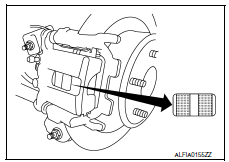
- Check pad thickness from the inspection hole on cylinder body.
Check using a scale if necessary
DISC ROTOR
DISC ROTOR : Inspection of Rotor
VISUAL
Check surface of disc rotor for uneven wear, cracks, and serious damage. Replace if necessary.
RUNOUT
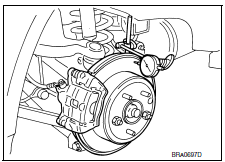
- Attach disc rotor to wheel hub using wheel nuts (at two or more positions).
- Inspect runout using dial gauge placed at 10 mm (0.39 in) inside
disc edge.
NOTE: Before measuring, make sure that wheel bearing axial end play is within the specification. Refer to RAX-5, "Inspection". - When runout exceeds limit value, displace mounting positions of disc rotor by one hole. Then find a position of the minimum value for runout.
- If runout is outside the specified value after performing the above operation, refinish the disc rotor using Tool.
THICKNESS
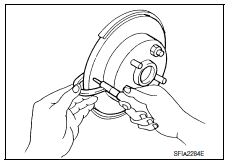
Check the thickness of the disc rotor using a micrometer. Replace disc rotor if the thickness is less than the wear limit.
 Front disc brake
BRAKE PAD
BRAKE PAD : Inspection of Pad
PAD WEAR
Check pad thickness from the inspection hole on cylinder body.
Check using a scale if necessary
DISC ROTOR
DISC ROTOR : Inspection of Rot ...
 Brake booster
Inspection
OPERATION
With engine stopped, change vacuum to atmospheric pressure by
depressing brake pedal several times. Then with brake pedal fully
depressed, start engine and when vacuum pre ...
Other materials:
Periodic maintenance
FRONT SUSPENSION ASSEMBLY
Inspection and Adjustment
INSPECTION
Make sure the mounting conditions (looseness, backlash) of each component and
component conditions (wear, damage) are normal.
LOWER BALL JOINT END PLAY
Set front wheels in a straight-ahead position. Do not depress
brake peda ...
Ignition signal
Description
The ignition signal from the ECM is sent to and amplified by the power
transistor. The power transistor turns
ON and OFF the ignition coil primary circuit. This ON/OFF operation induces the
proper high voltage in the coil
secondary circuit.
Component Function Check
1.INSPECTIO ...
Both side headlamps (LO) are not turned on
Description
The headlamps (both sides) do not turn ON in any lighting switch setting.
Diagnosis Procedure
1.CHECK COMBINATION SWITCH (LIGHTING AND TURN SIGNAL SWITCH)
Check the combination switch (lighting and turn signal switch
2.CHECK HEADLAMP (LO) REQUEST SIGNAL INPUT
CONSULT DATA MONITOR
...
Nissan Maxima Owners Manual
- Illustrated table of contents
- Safety-Seats, seat belts and supplemental restraint system
- Instruments and controls
- Pre-driving checks and adjustments
- Monitor, climate, audio, phone and voice recognition systems
- Starting and driving
- In case of emergency
- Appearance and care
- Do-it-yourself
- Maintenance and schedules
- Technical and consumer information
Nissan Maxima Service and Repair Manual

0.0168