
Nissan Maxima Service and Repair Manual: Power steering oil pump
Exploded View
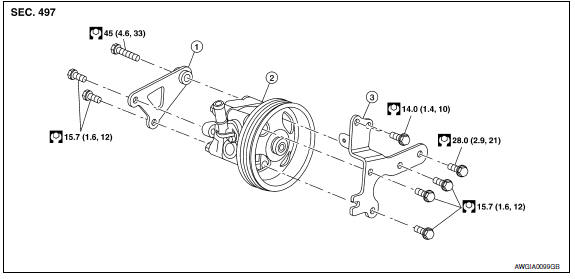
- Rear bracket
- Power steering oil pump assembly
- Front bracket
Removal and Installation
NOTE: When removing components such as hoses, tubes/lines, etc., cap or plug openings to prevent fluid from spilling.
REMOVAL
- Remove front wheel and tire (RH) using power tool. Refer to WT-60, "Adjustment".
- Remove front fender protector side cover. Refer to EXT-23, "Exploded View".
- Remove hood ledge cover (RH).
- Drain power steering fluid. Refer to ST-12, "Draining".
- Disconnect the power steering pressure sensor harness connector at the high pressure pipe. Refer to ST- 29, "Exploded View".
- Disconnect high pressure piping and suction hose from power steering oil pump. Refer to ST-29, "Exploded View".
- Loosen drive belt. Refer to EM-14, "Removal and Installation".
- Remove drive belt from power steering oil pump pulley.
- Remove power steering oil pump bolts, and then remove power steering oil pump.
INSTALLATION
Installation is in the reverse order of removal.
- When installing power steering oil pump, install all bolts by hand initially, then tighten bolts to specification.
- Perform the following procedures after installing.
- Check belt tension. Refer to EM-14, "Checking Drive Belts".
- Bleed air from power steering system.
 Steering gear and linkage
Exploded View
Cotter pin
Steering gear assembly Front
Removal and Installation
NOTE: When removing components such as
hoses, tubes/lines, etc., cap or plug openings to prevent fluid ...
 Hydraulic line
Exploded View
High pressure hose
Suction hose
Reservoir tank bracket
Reservoir tank
Oil pump assembly
Steering gear assembly
Low pressure piping
Eye bolt
High pressure pipin ...
Other materials:
RGB (B: blue) signal circuit
Description
Transmit the image displayed with AV control unit with RGB signal to the
display unit.
Diagnosis Procedure
1.CHECK CONTINUITY RGB (B: BLUE) SIGNAL CIRCUIT
Turn ignition switch OFF.
Disconnect display unit connector M141 and AV control unit
connector M117.
Check contin ...
Wiring diagram
CVT CONTROL SYSTEM
Wiring Diagram
...
Cup holders
Front cup holders
CAUTION
Avoid abrupt starting and braking when
the cup holder is being used to prevent
spilling the drink. If the liquid is hot, it
can scald you or your passenger. Spilled
liquid can also damage the seat climate
system.
Use only soft cups in the cup holder.
...
Nissan Maxima Owners Manual
- Illustrated table of contents
- Safety-Seats, seat belts and supplemental restraint system
- Instruments and controls
- Pre-driving checks and adjustments
- Monitor, climate, audio, phone and voice recognition systems
- Starting and driving
- In case of emergency
- Appearance and care
- Do-it-yourself
- Maintenance and schedules
- Technical and consumer information
Nissan Maxima Service and Repair Manual

0.0113