
Nissan Maxima Service and Repair Manual: Rear seat belt
Exploded View
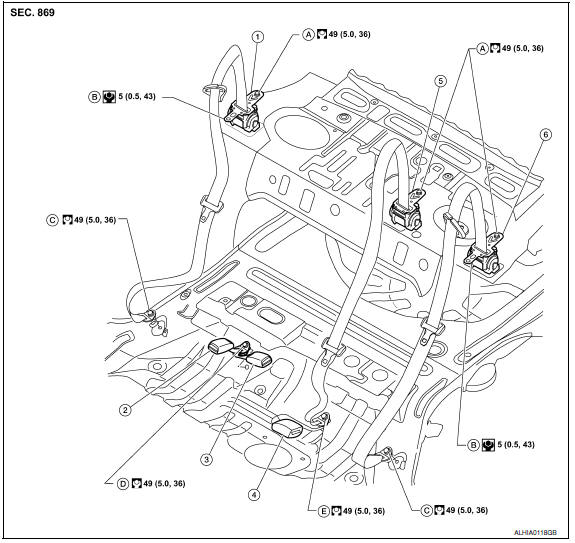
- Seat belt retractor assembly (RH)
- Seat belt buckle (RH)
- Seat belt buckle center
- Seat belt buckle (LH)
- Seat belt retractor assembly center
- Seat belt retractor assembly (LH)
- Retractor anchor bolt
- Retractor anti-rotation screw
- Lower anchor bolt outer
- Seat belt buckle anchor bolt
- Lower anchor bolt center
Removal and Installation
REMOVAL OF SEAT BELT RETRACTOR - OUTER
- Remove the rear seat cushion. Refer to SE-128, "Exploded View - Fixed Seatback" (with fixed seatback, W/O CLIMATE CONTROLLED SEATS), or SE-130, "Exploded View - 60:40 Split Seatback" (with split seatback, W/O CLIMATE CONTROL CONTROLLED SEATS), or SE-70, "Exploded View - Fixed Seatback" (with fixed seatback, WITH CLIMATE CONTROLLED SEATS) SE-72, "Exploded View - 60:40 Split Seatback" (with split seatback, WITH CLIMATE CONTROLLED SEATS).
- Remove the lower anchor bolt outer.
- Lower the rear seatback assembly.
- Remove the rear parcel shelf finisher.
- Remove retractor anchor bolt and retractor anti-rotation screw, then remove seat belt retractor assembly (LH/RH).
INSTALLATION OF SEAT BELT RETRACTOR - OUTER
Installation is in the reverse order of removal.
- Always perform an inspection after repair to be sure the system in functioning within specifications. Refer to SB-3, "Inspection".
REMOVAL OF SEAT BELT RETRACTOR - CENTER
- Remove the rear seat cushion. Refer to SE-128, "Removal and Installation" (W/O CLIMATE CONTROL - BUCKET SEAT), or SE-131, "Removal and Installation" (W/O CLIMATE CONTROL - BENCH SEAT), or SE-70, "Removal and Installation" (WITH CLIMATE CONTROL - BUCKET SEAT).
- Remove the lower anchor bolt center.
- Lower the rear seatback assembly.
- Remove the rear parcel shelf finisher. Refer to INT-28, "Removal and Installation".
- Remove retractor anchor bolt, then remove seat belt retractor assembly center.
INSTALLATION OF SEAT BELT RETRACTOR - CENTER
Installation is in the reverse order of removal.
- Always perform an inspection after repair to be sure the system in functioning within specifications. Refer to SB-3, "Inspection".
REMOVAL OF SEAT BELT BUCKLE
- Remove the rear seat cushion. Refer to SE-128, "Removal and Installation" (with fixed seatback, W/O CLIMATE CONTROLLED SEATS), or SE-131, "Removal and Installation" (with split seatback, W/O CLIMATE CONTROL CONTROLLED SEATS), or SE-70, "Removal and Installation" (with fixed seatback, WITH CLIMATE CONTROLLED SEATS) SE-73, "Removal and Installation" (with split seatback, WITH CLIMATE CONTROLLED SEATS).
- Remove seat belt buckle anchor bolt, then remove the seat belt buckle. Refer to SB-8, "Exploded View".
INSTALLATION OF SEAT BELT BUCKLE
Installation is in the reverse order of removal.
- Always perform an inspection after repair to be sure the system is functioning within specifications. R
 Front seat belt
Exploded View
D-ring anchor
Adjustable upper anchor cover
Seat belt buckle
Seat belt buckle connector
Lower anchor bolt cover
Seat belt pre-tensioner connector
Seat belt retracto ...
 Latch system for children
Removal and Installation
NOTE: The LATCH (Lower Anchors and Tether for
Children) system is a built-in part of the vehicle structure, and is not
servicable. : Front ...
Other materials:
B2632, B2633 air mix door motor (driver side)
Description
COMPONENT DESCRIPTION
Air Mix Door Motor (Driver side)
The air mix door motor (driver side) (1) is attached to the heater
&
cooling unit assembly.
It rotates so that the air mix door is opened or closed to a
position
set by the A/C auto amp.
Motor rotation is then ...
P050A, P050e cold start control
Description
ECM controls ignition timing and engine idle speed when engine is started
with pre-warming up condition.
This control promotes the activation of three way catalyst by heating the
catalyst and reduces emissions.
DTC Logic
DTC DETECTION LOGIC
NOTE:
If DTC P050A or P050E is dis ...
Brake pedal
Exploded View
Clevis pin
Snap pin
Stop lamp switch
ASCD cancel switch
Clip
Brake pedal assembly
Brake pedal pad
NOTE:
The clevis pin must be installed from the RH side as shown.
Removal and Installation
REMOVAL
Remove instrument lower panel LH and lower knee protec ...
Nissan Maxima Owners Manual
- Illustrated table of contents
- Safety-Seats, seat belts and supplemental restraint system
- Instruments and controls
- Pre-driving checks and adjustments
- Monitor, climate, audio, phone and voice recognition systems
- Starting and driving
- In case of emergency
- Appearance and care
- Do-it-yourself
- Maintenance and schedules
- Technical and consumer information
Nissan Maxima Service and Repair Manual

0.0098