
Nissan Maxima Service and Repair Manual: Diagnosis sensor unit
Removal and Installation
WARNING:
- Before servicing, turn ignition switch OFF, disconnect both battery terminals and wait at least 3 minutes.
- Before disconnecting the air bag sensor unit harness connector, be sure to disconnect the harness connector of each air bag module and pre-tensioner seat belt to prevent air bag deployment by static electricity.
- Do not use air tools or electric tools for servicing.
- When replacing the air bag diagnosis sensor unit, always check with the parts department for the latest parts information. Installing an incorrect air bag diagnosis sensor unit may or may not cause the air bag warning lamp to illuminate and may cause incorrect deployment of the supplemental air bags and seat belt pre-tensioner in a collision resulting in serious personal injury or death.
REMOVAL
- Diagnosis sensor unit harness connector
- Diagnosis sensor unit shield
- Diagnosis sensor unit
- Diagnosis sensor unit bolts
 Front
Front
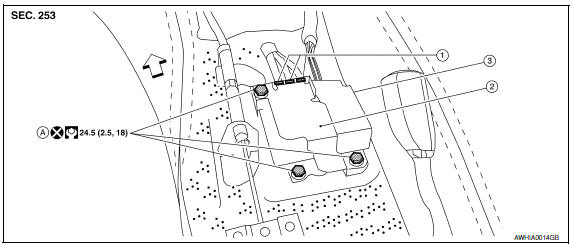
- Always check the air bag diagnosis sensor unit ECU discriminated number (identification number) or part number using CONSULT.
- Disconnect the negative and positive battery terminals, then wait at least 3 minutes. Refer to PG-67, "Removal and Installation (Battery)".
- Disconnect the harness connectors for each of the following SRS components. Refer to SR-19, "Removal and Installation" (Side curtain air bag module), SE-68, "Removal and Installation" (Side air bag module with climate controlled seats) or SE-126, "Removal and Installation" (Side air bag module without climate controlled seats), SB-6, "Removal and Installation" (Seat belt pre-tensioner).
- Remove the center console. Refer to IP-21, "Disassembly and Assembly".
- Disconnect the harness connectors from the diagnosis sensor unit.
- Remove the bolts, then remove the diagnosis sensor unit.
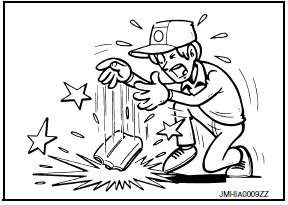
CAUTION:
- Do not impact the air bag diagnosis sensor unit.
- Do not cause an impact to the diagnosis sensor unit by dropping etc. Replace the diagnosis sensor unit if it has been dropped or sustained an impact.
INSTALLATION
Installation is in the reverse order of removal.
CAUTION:
- Do not use old bolts after removal; replace with new bolts.
- Be careful not to damage the diagnosis sensor unit harness.
- After the work is completed, make sure no system malfunction is detected by air bag warning lamp.
- In case a malfunction is detected by the air bag warning lamp, reset by the self-diagnosis function and delete the memory by CONSULT.
- - If a malfunction is still detected after the above operation,
perform self-diagnosis to repair malfunctions.
Refer to SRC-12, "SRS Operation Check".
- After replacing the air bag diagnosis sensor unit, confirm using CONSULT that the ECU discriminated number (identification number) or part number of the new replacement air bag diagnosis sensor unit matches the ECU discriminated number (identification number) or part number of the replaced (old) air bag diagnosis sensor unit.
NOTE: If the ECU discriminated number or part number of the new replacement air bag diagnosis sensor unit differs from the ECU discriminated number or part number of the replaced air bag diagnosis sensor unit, reconfirm the parts information and verify that the correct air bag diagnosis sensor unit was installed.
 Side air bag (satellite) sensor
Removal and Installation
CAUTION:
Before servicing, turn ignition switch OFF, disconnect both
battery terminals and wait at least 3 minutes.
Do not use air tools or electric tools for se ...
 Occupant classification system control unit
Removal and Installation
Removal and Installation
The occupant classification system control unit and sensor mat are an
integral part of the front passenger seat cushion, and are replaced as an
...
Other materials:
Variable induction air system
System Diagram
System Description
INPUT/OUTPUT SIGNAL CHART
*: ECM determines the start signal status by the signals of engine speed and
battery voltage.
SYSTEM DESCRIPTION
In the medium speed range, the power valves are closed. Under this condition,
the pressure waves of the
...
Front door glass
Exploded View
Door panel
Door glass
Regulator assembly
Door module assembly
Window motor
Removal and Installation
REMOVAL
Remove the front door finisher. Refer to INT-18, "Removal and
Installation".
Remove the adhesive bolt hole covers.
Reconnect the window switch to ...
Exterior and interior lights
Always check with the Parts Department at a NISSAN dealer for the latest
parts information.
* It is recommended that you visit a NISSAN dealer for replacement.
1. Map light
2. Personal light
3. Step light
4. Door mirror turn signal light (if so
equipped)
5. Headlight assembly
6. ...
Nissan Maxima Owners Manual
- Illustrated table of contents
- Safety-Seats, seat belts and supplemental restraint system
- Instruments and controls
- Pre-driving checks and adjustments
- Monitor, climate, audio, phone and voice recognition systems
- Starting and driving
- In case of emergency
- Appearance and care
- Do-it-yourself
- Maintenance and schedules
- Technical and consumer information
Nissan Maxima Service and Repair Manual

0.0107