
Nissan Maxima Service and Repair Manual: Seat memory switch
Removal and Installation
REMOVAL
- Remove the seat memory finisher using a suitable tool (1). Refer to INT-18, "Removal and Installation".
- Release the pawls and remove seat memory switch (2) from seat memory finisher (1).
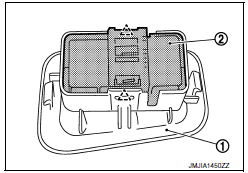
 : Pawl
INSTALLATION
Installation is in the reverse order of removal.
CAUTION: Be sure to install the harness in the right place.
 Automatic drive positioner control unit
Removal and Installation
REMOVAL
Remove audio unit. Refer to AV-73, "Removal and Installation"
(BASE AUDIO), AV-161, "Removal and Installation" (BOSE W/MONOCHROME
DISPLAY), AV-481, "Removal ...
 Tilt&telescopic switch
Removal and Installation
REMOVAL
Remove the steering column side cover (LH) (1). Refer to IP-13,
"Removal and Installation".
Release the pawls and remove tilt & telescopic switch (2) fro ...
Other materials:
System malfunction
If the PFCW system malfunctions, it will be
turned off automatically, a chime will sound, the
FEB system warning light (orange) will illuminate
and the warning message [Malfunction] will appear
in the vehicle information display.
Action to take
If the warning light (orange) comes on, stop the
...
Driver air bag module
Exploded View
Driver air bag module
Side lid
Driver air bag module harness connectors
Steering wheel switch assembly connector
Driver air bag module bolt
Removal and Installation
CAUTION:
Before servicing, turn ignition switch OFF, disconnect both
battery terminals and wai ...
RGB synchronizing signal circuit
Description
Transmit the RGB synchronizing signal to the display unit so as to
synchronize the RGB image displayed with
AV control unit.
Diagnosis Procedure
1.CHECK CONTINUITY RGB SYNCHRONIZING SIGNAL CIRCUIT
Turn ignition switch OFF.
Disconnect display unit connector M141 and AV co ...
Nissan Maxima Owners Manual
- Illustrated table of contents
- Safety-Seats, seat belts and supplemental restraint system
- Instruments and controls
- Pre-driving checks and adjustments
- Monitor, climate, audio, phone and voice recognition systems
- Starting and driving
- In case of emergency
- Appearance and care
- Do-it-yourself
- Maintenance and schedules
- Technical and consumer information
Nissan Maxima Service and Repair Manual

0.0072