
Nissan Maxima Service and Repair Manual: Remote keyless entry receiver
Removal and Installation
REMOVAL
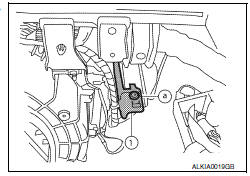
- Remove glove box assembly. Refer to IP-20, "Removal and Installation".
- Disconnect the harness connector from the remote keyless entry receiver (1).
- Remove the screw (a) and remote keyless entry receiver (1).
INSTALLATION
Installation is in the reverse order of removal
 Intelligent key battery
Removal and Installation
Release the lock knob at the back of the Intelligent Key and remove the
mechanical key.
Insert a suitable tool (A) wrapped with a cloth into the slit of the
c ...
 Outside key antenna
REAR BUMPER
REAR BUMPER : Removal and Installation
REMOVAL
Remove the rear bumper. Refer to EXT-17, "Removal and
Installation".
Disconnect harness connector (1) from the outsid ...
Other materials:
P0745 pressure control solenoid A
Description
The line pressure solenoid valve regulates the oil pump discharge pressure to
suit the driving condition in
response to a signal sent from the TCM.
DTC Logic
DTC DETECTION LOGIC
DTC CONFIRMATION PROCEDURE
NOTE:
Immediately after performing any "DTC CONFIRMATION PROCEDURE", a ...
Inspection and adjustment
ADDITIONAL SERVICE WHEN REPLACING CONTROL UNIT
ADDITIONAL SERVICE WHEN REPLACING CONTROL UNIT : Description
Initialization of system should be conducted after the following conditions.
When the sunroof motor or sunshade motor is changed.
When the sunroof of sunshade does not operate normally ...
Rear seat
Exploded View - Fixed Seatback
Headrest
Headrest holder (free)
Headrest holder (locked)
Bumper
Seatback assembly
Seatback trim
Seatback pad
Seat cushion trim
Seat cushion pad
Seat cushion wire cover
Seat cushion lock
Seat cushion assembly
Removal and Installati ...
Nissan Maxima Owners Manual
- Illustrated table of contents
- Safety-Seats, seat belts and supplemental restraint system
- Instruments and controls
- Pre-driving checks and adjustments
- Monitor, climate, audio, phone and voice recognition systems
- Starting and driving
- In case of emergency
- Appearance and care
- Do-it-yourself
- Maintenance and schedules
- Technical and consumer information
Nissan Maxima Service and Repair Manual

0.007