
Nissan Maxima Service and Repair Manual: Rear door glass
Exploded View
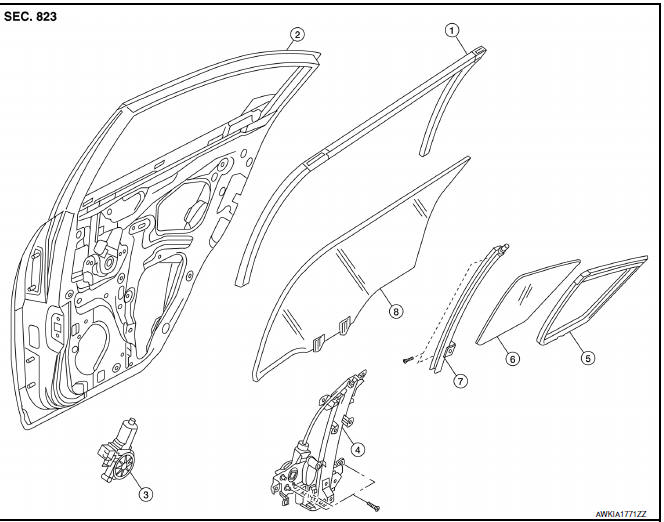
- Door glass run
- Door panel
- Window motor
- Regulator assembly
- Partition glass run
- Partition glass
- Partition sash
- Door glass
Removal and Installation
REMOVAL
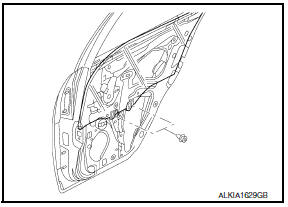
- Remove the rear door finisher. Refer to INT-21, "Removal and Installation".
- Position the vapor barrier aside.
- Temporarily reconnect the power window switch and raise/lower the door window until the glass bolts can be seen.
- Remove the glass bolts, and place the glass on the inner bottom of the panel.
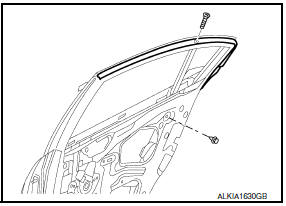
- Remove the partition sash from the glass run.
- Remove the partition sash bolt (lower) and screw (upper) to remove the sash.
- Remove the partition glass and door glass from the inside of the panel.
INSTALLATION
Installation is in the reverse order of removal.
Inspection and Adjustment
FITTING INSPECTION
- Check that the glass is securely fit into the glass run groove.
- Lower the glass slightly [approximately 10 to 20 mm (0.39 to 0.79 in)], and check that the clearance to the sash is parallel. If the clearance between the glass and sash is not parallel, loosen the regulator bolts, guide rail bolts, and glass and carrier plate bolts to correct the glass position.
 Front regulator
Exploded View
Door panel
Door glass
Regulator assembly
Door module assembly
Window motor
Removal and Installation
REMOVAL
Remove the front door finisher. Refer to INT-18, "R ...
 Rear regulator
Rear Door Glass Regulator
REMOVAL
Remove the rear door finisher. Refer to INT-21, "Removal and
Installation".
Position aside the vapor barrier.
Temporarily reconnect the power window ...
Other materials:
Power consumption control system
System Diagram
System Description
OUTLINE
IPDM E/R incorporates a power consumption control function that
reduces the power consumption according
to the vehicle status.
IPDM E/R changes its status (control mode) with the sleep wake up
signal received from BCM via CAN communicati ...
M&A branch line circuit
Diagnosis Procedure
1.CHECK CONNECTOR
Turn the ignition switch OFF.
Disconnect the battery cable from the negative terminal.
Check the terminals and connectors of the combination meter for
damage, bend and loose connection
(unit side and connector side).
2.CHECK HARNESS FOR OPEN CI ...
Tire Pressure Monitoring System
(TPMS)
WARNING
Radio waves could adversely affect
electric medical equipment. Those
who use a pacemaker should contact
the electric medical equipment
manufacturer for the possible influences
before use.
This vehicle is equipped with the Tire
Pressure Monitoring System (TPMS). It
monitors tire pres ...
Nissan Maxima Owners Manual
- Illustrated table of contents
- Safety-Seats, seat belts and supplemental restraint system
- Instruments and controls
- Pre-driving checks and adjustments
- Monitor, climate, audio, phone and voice recognition systems
- Starting and driving
- In case of emergency
- Appearance and care
- Do-it-yourself
- Maintenance and schedules
- Technical and consumer information
Nissan Maxima Service and Repair Manual

0.0109