
Nissan Maxima Service and Repair Manual: Power window and door lock/unlock switch RH
Removal and Installation
REMOVAL
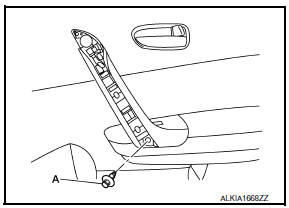
- Remove the front door grip cover. Refer to INT-18, "Removal and Installation".
- Remove the clip (A) from the door grip using suitable tool.
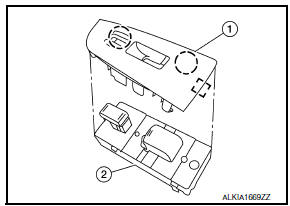
- Release the metal clip and lift the power window and door lock/
unlock switch (2) and switch finisher (1) as an assembly starting
from the rear using a suitable tool, pull upward to remove it from
the front door finisher.
 : Metal clip
 - Disconnect the harness connector from the power window and door lock/unlock switch.
- Release the pawls on each side to separate the switch finisher
(1) from the power window and door lock/unlock switch (2).
 : Pawl
CAUTION: Do not damage the pawl of the switch finisher.
INSTALLATION Installation is in the reverse order of removal.
NOTE: Whenever the power window and door lock/unlock switch is disconnected from the harness connector, it is necessary to perform the Initialization procedure.
 Main power window and door lock/unlock switch
Removal and Installation
REMOVAL
Remove the front door grip cover. Refer to DLK-214, "FRONT DOOR :
Removal and Installation".
Remove the clip (A) from the door grip using a suitabl ...
 Rear power window switch
Removal and Installation
REMOVAL
Remove the rear door armrest finisher. Refer to INT-21,
"Removal and Installation".
Release the pawls on each side to separate the switch finis ...
Other materials:
Precaution
PRECAUTIONS
Precautions for Trouble Diagnosis
CAUTION:
Never apply 7.0 V or more to the measurement terminal.
Use a tester with open terminal voltage of 7.0 V or less.
Turn the ignition switch OFF and disconnect the battery cable from the
negative terminal when checking the harness.
P ...
Driver Attention Alert (if so equipped)
WARNING
Failure to follow the warnings and instructions
for proper use of the Driver Attention
Alert system could result in serious injury
or death.
The Driver Attention Alert system is only
a warning to inform the driver of a potential
lack of driver attention or
drowsiness. It will not ste ...
Maintenance precautions
When performing any inspection or maintenance
work on your vehicle, always take care to prevent
serious accidental injury to yourself or damage to
the vehicle. The following are general precautions
which should be closely observed.
WARNING
Park the vehicle on a level surface, apply
the pa ...
Nissan Maxima Owners Manual
- Illustrated table of contents
- Safety-Seats, seat belts and supplemental restraint system
- Instruments and controls
- Pre-driving checks and adjustments
- Monitor, climate, audio, phone and voice recognition systems
- Starting and driving
- In case of emergency
- Appearance and care
- Do-it-yourself
- Maintenance and schedules
- Technical and consumer information
Nissan Maxima Service and Repair Manual

0.0088