
Nissan Maxima Service and Repair Manual: Illumination
Removal and Installation
TRUNK ROOM LAMP
Removal
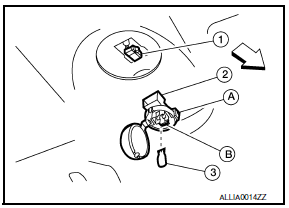
- Release the tab (A), then swing open the lens.
 : Front
 - Remove the bulb (3).
- Release the tab (B), then pull trunk room lamp (2) away from body opening.
- Disconnect the connector (1) and remove trunk room lamp
Installation
Installation is in the reverse order of removal.
Bulb Replacement
WARNING: Do not touch bulb while it is lit or right after being turned OFF. Burning may result.Caution: -Do not touch glass surface of the bulb with bare hands or allow oil or grease to get on it to prevent damage to bulb.
- Release the tab (A), then swing open the trunk room lamp len.
- Pull bulb (3) straight out to remove.
- Install the new bulb to trunk room lamp.
- Install the trunk room lamp lens (2).
 Interior room lamp
Removal and Installation
FRONT ROOM/MAP LAMP ASSEMBLY
Removal
Release the metal clips and drop front edge of front room/map
lamp assembly (1) away from headlining. Slide front room/map lamp
...
 Service data and specifications (SDS)
Bulb Specifications
* Always check with the Parts Department for the latest parts information. ...
Other materials:
Locking doors
1. Move the shift lever to the P (Park) position,
place the ignition switch in the LOCK position
and make sure you carry the Intelligent
Key with you.
2. Close all doors.
3. Push any door handle request switch while
carrying the Intelligent Key with you.
4. All doors will lock.
5 ...
Extending engine run time
The remote start feature can be extended one
time by performing the steps listed in "Remote
starting the vehicle" in this section. Run time will
be calculated as follows:
The first 10 minute run time will start when
the remote start function is performed.
The second 10 minutes will start ...
Front stabilizer
Removal and Installation
REMOVAL
Remove the steering gear and linkage. Refer to ST-26, "Removal and
Installation".
Remove the nuts on the upper portion of stabilizer connecting
rod
Remove the stabilizer clamp bolts.
Remove the front stabilizer from the vehicle
INSPECTION AFTER ...
Nissan Maxima Owners Manual
- Illustrated table of contents
- Safety-Seats, seat belts and supplemental restraint system
- Instruments and controls
- Pre-driving checks and adjustments
- Monitor, climate, audio, phone and voice recognition systems
- Starting and driving
- In case of emergency
- Appearance and care
- Do-it-yourself
- Maintenance and schedules
- Technical and consumer information
Nissan Maxima Service and Repair Manual

0.0076