
Nissan Maxima Service and Repair Manual: Audio display unit
Removal and Installation
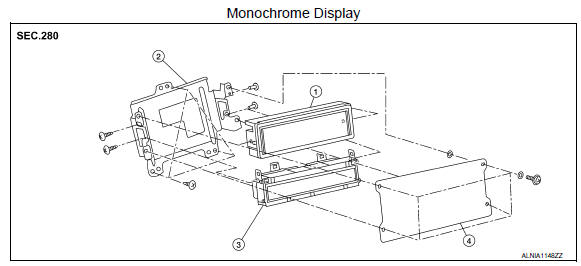
- Audio display unit
- Audio & A/C display unit bracket
- A/C display unit
- Front cover
REMOVAL
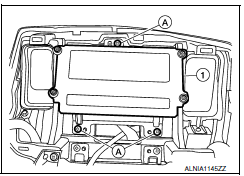
- Disconnect the battery negative terminal. Refer to PG-67, "Removal and Installation (Battery)".
- Remove cluster lid D. Refer to IP-11, "Removal and Installation".
- Remove the audio & A/C display unit bracket screws (A).
- Pull out the audio & A/C display unit assembly (1), disconnect the harness connectors from the audio display unit and remove.
- Remove the front cover, then disconnect the audio display unit connectors and remove the audio display unit from the audio/A/C display unit brackets.
INSTALLATION
Installation is in the reverse order of removal.
 Audio unit
Removal and Installation
Audio unit brackets (LH/RH)
A/C auto amp.
Cluster lid C lower
Audio unit Clip
Pawl
REMOVAL
Disconnect the battery negative terminal. Refer to PG- ...
 Front tweeter
Removal and Installation
REMOVAL
Remove the front pillar finisher. Refer to IP-10, "Exploded View".
Remove the front tweeter speaker grille. Refer to IP-10, "Exploded
View".
Remove the f ...
Other materials:
Vehicle security system
Your vehicle has two types of security systems:
Vehicle security system
NISSAN Vehicle Immobilizer System
The vehicle security system provides visual and
audible alarm signals if someone opens the
doors, trunk, or hood when the system is armed. It
is not, however, a motion detection ...
Trouble diagnosis
Condition of Error Detection
DTC (e.g. U1000 and U1001) of CAN communication is indicated on SELF-DIAG
RESULTS on CONSULT if a
CAN communication signal is not transmitted or received between units for 2
seconds or more.
CAN COMMUNICATION SYSTEM ERROR
CAN communication line open (CAN-H, ...
B2553 ignition relay
Description
BCM turns ON the following relays to ignition power supply to each ECU when
the ignition switch is turned
ON.
Ignition relay-1 (inside IPDM E/R)
Ignition relay-2 (inside fuse block (J/B))
Front blower motor relay
BCM checks any ignition relay ON request for consistency wi ...
Nissan Maxima Owners Manual
- Illustrated table of contents
- Safety-Seats, seat belts and supplemental restraint system
- Instruments and controls
- Pre-driving checks and adjustments
- Monitor, climate, audio, phone and voice recognition systems
- Starting and driving
- In case of emergency
- Appearance and care
- Do-it-yourself
- Maintenance and schedules
- Technical and consumer information
Nissan Maxima Service and Repair Manual

0.0096