
Nissan Maxima Service and Repair Manual: Bluetooth control unit
Removal and Installation
REMOVAL
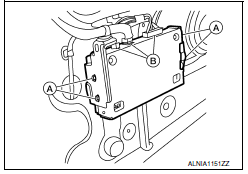
- Disconnect the battery negative terminal. Refer to PG-67, "Removal and Installation (Battery)".
- Remove the trunk upper finisher. Refer to INT-23, "Exploded View".
- Remove the parcel shelf finisher. Refer to INT-28, "Removal and Installation".
- From inside the passenger compartment, remove the Bluetooth control unit bracket screws.
- From inside the trunk, disconnect the Bluetooth control unit connectors (B) and remove the Bluetooth control unit and bracket assembly.
- Remove the Bluetooth control unit bracket screws (A) to remove the Bluetooth control unit from the Bluetooth control unit brackets.
INSTALLATION
Installation is in the reverse order of removal.
 Tel antenna
Removal and Instalation
REMOVAL
Disconnect the battery negative terminal. Refer to PG-67, "Removal
and Installation (Battery)".
Remove the rear parcel shelf finisher. Refer to INT-28, "R ...
 Basic inspection
DIAGNOSIS AND REPAIR WORKFLOW
Work Flow
OVERALL SEQUENCE
1.GET INFORMATION FOR SYMPTOM
Get detailed information from the customer about the symptom (the condition
and the environment when the ...
Other materials:
Normal operating condition
Description
Symptom
Result
Slight vibrations are felt on the brake pedal and the operation
noises occur, when VDC, TCS or ABS is activated.
This is a normal condition
due to the VDC,
TCS or ABS activation.
Stopping distance is longer than that of v ...
B2555 stop lamp
Description
BCM detects the stop lamp status and confirms the stop
lamp switch ON/OFF status. BCM confirms the
engine start condition according to the stop lamp switch ON/OFF status.
DTC Logic
DTC DETECTION LOGIC
DTC CONFIRMATION PROCEDURE
1.PERFORM DTC CONFIRMATION PROCEDURE
...
Turning the FEB system on/off
Perform the following steps to turn the FEB systems
ON or OFF.
1. Press the button until
"Settings" displays
in the vehicle information display and
then press OK button. Use the
button
to select "Driver Assistance". Then press the
OK button.
2. Select "Emergency Brake" ...
Nissan Maxima Owners Manual
- Illustrated table of contents
- Safety-Seats, seat belts and supplemental restraint system
- Instruments and controls
- Pre-driving checks and adjustments
- Monitor, climate, audio, phone and voice recognition systems
- Starting and driving
- In case of emergency
- Appearance and care
- Do-it-yourself
- Maintenance and schedules
- Technical and consumer information
Nissan Maxima Service and Repair Manual

0.0073