
Nissan Maxima Service and Repair Manual: Subwoofer AMP
Removal and Installation
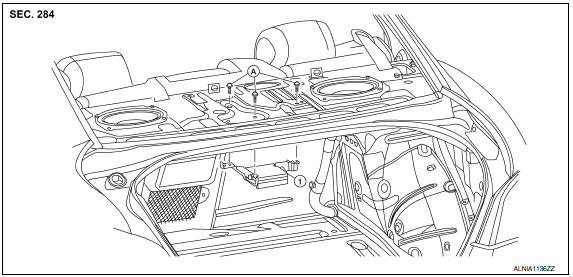
- Subwoofer amp. and bracket
- Subwoofer amp. bracket screws
REMOVAL
- Disconnect the battery negative terminal. Refer to PG-67, "Removal and Installation (Battery)".
- Remove the parcel shelf finisher. Refer to INT-28, "Removal and Installation". NOTE: The subwoofer amp. can be removed without removing the parcel amp finisher. If moving the subwoofer amp. and bracket, it is necessary to remove the parcel shelf finisher.
- Remove the trunk upper finisher. Refer to INT-36, "Exploded View".
- Remove the subwoofer amp. screws.
- Disconnect the harness connectors from the subwoofer amp. and remove.
INSTALLATION
Installation is in the reverse order of removal.
 Subwoofer
Removal and Installation
Subwoofer LH
Subwoofer RH
Subwoofer screws
Subwoofer connectors
REMOVAL
Remove the rear parcel shelf finisher. Refer to INT-36, "Removal
...
 Bose speaker AMP
Removal and Installation
Bose speaker amp.
Screws
REMOVAL
NOTE: If removing the BOSE speaker amp.
bracket, it is necessary to remove the parcel shelf finisher. The BOSE
speaker amp. ...
Other materials:
Intake sensor
Removal and Installation
REMOVAL
Remove the evaporator (2). Refer to HA-48, "EVAPORATOR:
Removal and Installation".
Release the intake sensor clip (A), then remove the intake sensor
(1).
CAUTION:
Mark the mounting position of the intake sensor.
Do not damage the evapora ...
HVAC branch line circuit
Diagnosis Procedure
1.CHECK CONNECTOR
Turn the ignition switch OFF.
Disconnect the battery cable from the negative terminal.
Check the terminals and connectors of the A/C auto amp. for
damage, bend and loose connection (unit
side and connector side).
2.CHECK HARNESS FOR OPEN CIRCUI ...
Memory function does not operate
Component Function Check
Symptom
Memory function does not operate normally.
The setting is not maintained. (It returns to the initial
condition.)
1.CHECK OPERATION
Set temperature control switch to 32C (90F).
Press the OFF switch.
Turn the ignition switch OFF.
Turn the ignitio ...
Nissan Maxima Owners Manual
- Illustrated table of contents
- Safety-Seats, seat belts and supplemental restraint system
- Instruments and controls
- Pre-driving checks and adjustments
- Monitor, climate, audio, phone and voice recognition systems
- Starting and driving
- In case of emergency
- Appearance and care
- Do-it-yourself
- Maintenance and schedules
- Technical and consumer information
Nissan Maxima Service and Repair Manual

0.0081