
Nissan Maxima Service and Repair Manual: Tel antenna
Removal and Installation
REMOVAL
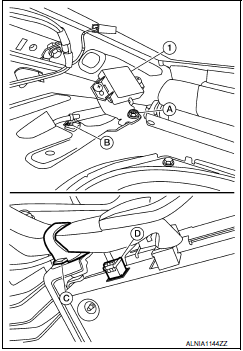
- Disconnect the battery negative terminal. Refer to PG-68, "Removal and Installation (Battery Tray)".
- Remove the rear parcel shelf finisher. Refer to INT-28, "Removal and Installation".
- Remove the Bluetooth antenna screw (A).
- Detach the Bluetooth antenna harness clip (B).
- Fold down the rear seat (if equipped) or open the trunk lid, then detach the Bluetooth antenna harness clip (C).
- Disconnect the harness connector (D) from the Bluetooth antenna (1) and remove.
INSTALLATION
Installation is in the reverse order of removal.
 Microphone
Removal and Installation
REMOVAL
Remove the map lamp assembly. Refer to INL-84, "Removal and
Installation".
Detach the microphone connector (A).
Remove the map lamp covers (1), the ...
 Bluetooth control unit
Removal and Installation
REMOVAL
Disconnect the battery negative terminal.
Remove the trunk upper finisher. Refer to INT-36, "Exploded View".
Remove the parcel shelf finisher. Refer to INT- ...
Other materials:
ABS branch line circuit
Diagnosis Procedure
1.CHECK CONNECTOR
Turn the ignition switch OFF.
Disconnect the battery cable from the negative terminal.
Check the terminals and connectors of the ABS actuator and
electric unit (control unit) for damage, bend
and loose connection (unit side and connector side).
...
Both side front fog lamps are not turned on
Description
The front fog lamps do not turn ON in any setting.
Diagnosis Procedure
1.COMBINATION SWITCH (LIGHTING AND TURN SIGNAL SWITCH) INSPECTION
Check the combination switch (lighting and turn signal switch).
2.CHECK FRONT FOG LAMP REQUEST SIGNAL INPUT
CONSULT DATA MONITOR
Select "FR F ...
Selecting the correct oil
It is essential to choose the correct grade, quality
and viscosity engine oil to ensure satisfactory
engine life and performance. For additional information,
refer to "Recommended fluids/lubricants
and capacities" in this section. NISSAN recommends
the use of an energy conserving oil in
or ...
Nissan Maxima Owners Manual
- Illustrated table of contents
- Safety-Seats, seat belts and supplemental restraint system
- Instruments and controls
- Pre-driving checks and adjustments
- Monitor, climate, audio, phone and voice recognition systems
- Starting and driving
- In case of emergency
- Appearance and care
- Do-it-yourself
- Maintenance and schedules
- Technical and consumer information
Nissan Maxima Service and Repair Manual

0.0074