
Nissan Maxima Service and Repair Manual: Bluetooth control unit
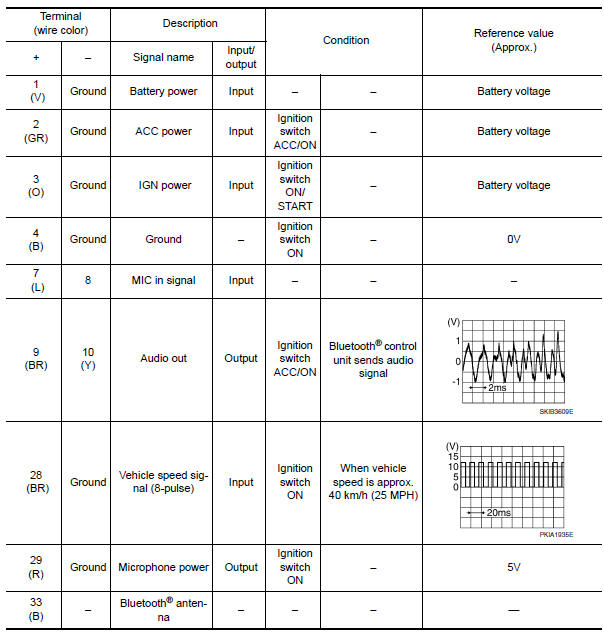
Reference Value
TERMINAL LAYOUT
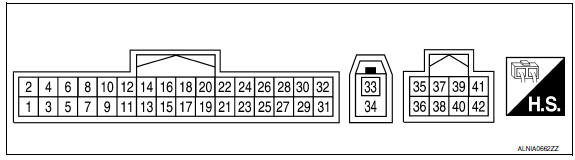
PHYSICAL VALUES
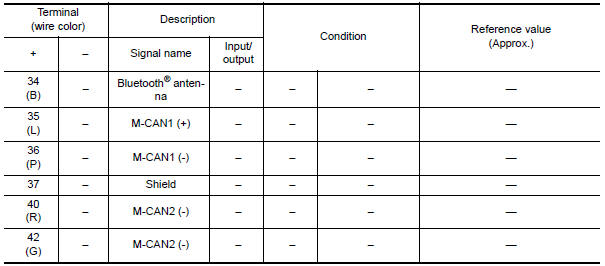
 Satellite radio tuner
Reference Value
PHYSICAL VALUES
...
 Wiring diagram
COLOR DISPLAY
Wiring Diagram - With BOSE Audio system Without Navigation System
...
Other materials:
Switch operation
Type A (if so equipped)
The windshield wiper and washer operates when
the ignition switch is placed in the ON position.
Push the lever down to operate the wiper at the
following speed:
Intermittent (INT) or (AUTO) - intermittent
operation can be adjusted by turning the
knob A .
L ...
P0451 evap control system pressure sensor
Description
The EVAP control system pressure sensor detects pressure in the
purge line. The sensor output voltage to the ECM increases as pressure
increases
DTC Logic
DTC DETECTION LOGIC
DTC CONFIRMATION PROCEDURE
NOTE:
Never remove fuel filler cap during DTC confirmation procedur ...
B1023 passenger air bag off indicator
Description
DTC B1023 FRONT PASSENGER AIR BAG OFF INDICATOR
The front passenger air bag off indicator is wired to the air bag diagnosis
sensor unit. The air bag diagnosissensor unit monitors the front passenger
air bag off indicator and circuit for failures.
PART LOCATION
DTC Logic
DTC DETE ...
Nissan Maxima Owners Manual
- Illustrated table of contents
- Safety-Seats, seat belts and supplemental restraint system
- Instruments and controls
- Pre-driving checks and adjustments
- Monitor, climate, audio, phone and voice recognition systems
- Starting and driving
- In case of emergency
- Appearance and care
- Do-it-yourself
- Maintenance and schedules
- Technical and consumer information
Nissan Maxima Service and Repair Manual

0.0094