
Nissan Maxima Service and Repair Manual: Oil cooler
Removal and Installation
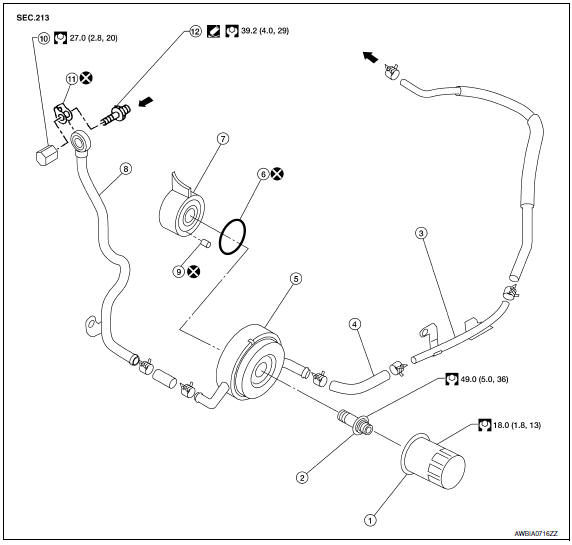
- Oil filter
- Oil cooler bolt
- Water pipe
- Water hose
- Oil cooler
- O-ring
- Oil pan
- Water pipe
- Relief valve
- Water drain plug
- Copper gasket
- Water connector
 Engine coolant flow
WARNING: Be careful not to get burned, engine coolant and engine oil may be hot.
CAUTION:
- When removing oil cooler, prepare a shop cloth to absorb any engine oil leakage or spillage.
- Completely wipe off any engine oil that adheres to the engine and the vehicle.
NOTE: When removing components such as hoses, tubes/lines, etc., cap or plug openings to prevent fluid from spilling.
REMOVAL
- Remove the engine under cover. Refer to EXT-15, "Exploded View".
- Remove the RH wheel and tire. Refer to WT-60, "Adjustment".
- Remove the front fender protector side cover (RH). Refer to EXT-23, "Exploded View".
- Drain engine coolant. CAUTION: Do not spill coolant on the drive belt.
- Disconnect water hoses from oil cooler.
- Remove the oil filter. Refer to LU-10, "Removal and Installation".
- Remove oil cooler.
INSPECTION AFTER REMOVAL
- Check oil cooler for cracks.
- Check oil cooler for clogging by blowing through coolant inlet. If necessary, replace oil cooler.
Oil Pressure Relief Valve
Inspect oil pressure relief valve for movement, cracks and breaks by pushing the ball. If replacement is necessary, remove valve by prying it out with a suitable tool. Install a new valve in place by tapping it.
INSTALLATION
Installation is in the reverse order of removal.
CAUTION:
- Do not reuse O-ring.
- Do not reuse copper gasket.
- When installing the oil cooler, align the oil cooler stopper with the stopper of the oil pan.
- Replace oil pressure relief valve after every removal.
INSPECTION AFTER INSTALLATION
Start engine and check for engine oil and coolant leaks. Repair as necessary.
 Oil pump
Removal and Installation
REMOVAL
Remove the engine from the vehicle. Refer to EM-103, "Removal and
Installation".
Remove the upper oil pan. Refer to EM-37, "Removal and
Instal ...
 Service data and specifications (SDS)
Oil Pressure
Regulator Valve
Oil Pump
Oil Capacity
...
Other materials:
A/C switch assembly signal circuit
Diagnosis Procedure
1.CHECK WITH SELF-DIAGNOSIS FUNCTION OF CONSULT
Using CONSULT, perform "SELF-DIAGNOSIS RESULTS" of HVAC.
Check if any DTC No. is displayed in the self-diagnosis results.
NOTE:
If DTC is displayed along with DTC U1000 or U1010, first diagnose the DTC U1000
or U1010.
...
Clip list
Descriptions for Clips
Replace any clips which are damaged during removal or installation
...
Horizontal synchronizing (HP) signal circuit
Description
In composite image (AUX image, camera image), transmit the vertical
synchronizing (VP) signal and horizontal synchronizing (HP) signal from
display unit to AV control unit so as to synchronize the RGB images displayed
with AV control unit such as the image quality adjusting menu, ...
Nissan Maxima Owners Manual
- Illustrated table of contents
- Safety-Seats, seat belts and supplemental restraint system
- Instruments and controls
- Pre-driving checks and adjustments
- Monitor, climate, audio, phone and voice recognition systems
- Starting and driving
- In case of emergency
- Appearance and care
- Do-it-yourself
- Maintenance and schedules
- Technical and consumer information
Nissan Maxima Service and Repair Manual

0.0079