
Nissan Maxima Service and Repair Manual: P0705 transmission range switch A
Description
- The Transmission range switch is included in the control valve assembly.
- The Transmission range switch includes 4 transmission position switches.
- TCM judges the selector lever position by the Transmission range switch signal.

DTC Logic
DTC DETECTION LOGIC

DTC CONFIRMATION PROCEDURE
CAUTION: Always drive vehicle at a safe speed.
NOTE: Immediately after performing any "DTC CONFIRMATION PROCEDURE", always turn ignition switch OFF.
Then wait at least 10 seconds before performing the next test.
1.CHECK DTC DETECTION
 With CONSULT
- Turn ignition switch ON.
- Select "Data Monitor" in "TRANSMISSION".
- Start engine.
- Drive vehicle and maintain the following conditions for at least 2 consecutive seconds.
 With GST
Follow the procedure "With CONSULT".
Diagnosis Procedure
Regarding Wiring Diagram information, refer to TM-126, "Wiring Diagram".
1.CHECK CVT POSITION
- Disconnect CVT unit connector.
- Remove control cable from manual lever. Refer toTM-173, "Exploded View".
- Check transmission range switch. Refer to TM-51, "Component Inspection (Transmisson Range Switch)".
2. CHECK HARNESS BETWEEN TCM AND TRANSMISSION RANGE SWITCH (PART 1)
- Turn ignition switch OFF.
- Disconnect TCM connector.
- Check continuity between TCM vehicle side harness connector terminals and CVT unit vehicle side harness connector terminals.
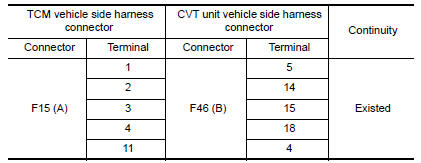
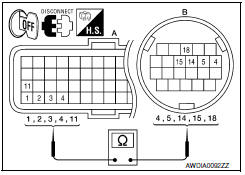
3. CHECK HARNESS BETWEEN TCM AND TRANSMISSION RANGE SWITCH (PART 2)
Check continuity between TCM vehicle side harness connector terminals and ground.
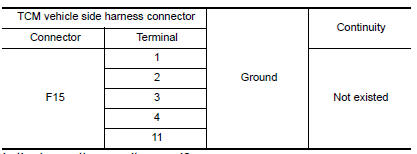
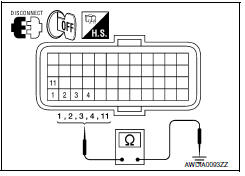
4.DETECT MALFUNCTIONING ITEMS
Check TCM connector pin terminals for damage or loose connection with harness connector.
Component Inspection (Transmisson Range Switch)
1.CHECK TRANSMISSION RANGE SWITCH
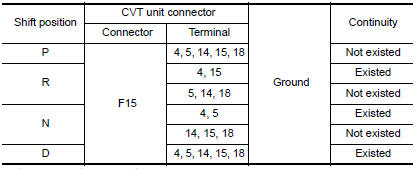
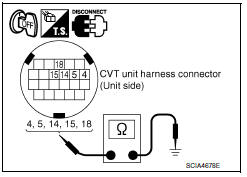
Check the continuity of the transmission range switch by changing selector lever to various positions and checking continuity between CVT unit terminals and ground.
 P0703 brake switch B
Description
BCM detects ON/OFF state of the stop lamp switch and transmits the data to
the TCM via CAN communication
by converting the data to a signal.
DTC Logic
DTC DETECTION LOGIC
DTC CON ...
 P0710 transmission fluid temperature sensor A
Description
The CVT fluid temperature sensor detects the CVT fluid temperature and sends
a signal to the TCM.
DTC Logic
DTC DETECTION LOGIC
DTC CONFIRMATION PROCEDURE
CAUTION: Always drive ve ...
Other materials:
Normal operating condition
COMPASS
COMPASS : Description
COMPASS
The electronic compass is highly protected from
changes in most magnetic fields. However, some large
changes in magnetic fields can affect it. Some examples are (but not limited
to): high tension power lines,
large steel buildings, sub ...
Operating range
The Intelligent Key functions can only be used
when the Intelligent Key is within the specified
operating range.
When the Intelligent Key battery is almost discharged
or strong radio waves are present near
the operating location, the Intelligent Key system's
operating range becomes narro ...
Water outlet and water piping
Removal and Installation
Heater hose
Clamp
Water hose
Clamp
Water outlet
Gasket
Gasket
Water connector
O-ring
Water bypass pipe
Clamp
Water hose
Heater pipe
Water hose
Heater hose
Engine coolant temperature sensor
Clamp
Radiator hose (upper)
&n ...
Nissan Maxima Owners Manual
- Illustrated table of contents
- Safety-Seats, seat belts and supplemental restraint system
- Instruments and controls
- Pre-driving checks and adjustments
- Monitor, climate, audio, phone and voice recognition systems
- Starting and driving
- In case of emergency
- Appearance and care
- Do-it-yourself
- Maintenance and schedules
- Technical and consumer information
Nissan Maxima Service and Repair Manual

0.0111