
Nissan Maxima Service and Repair Manual: Oil pan
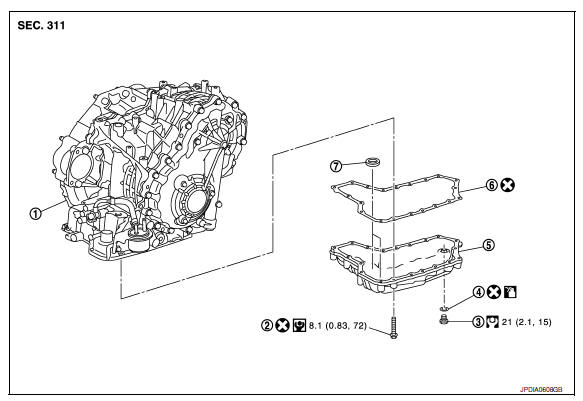
Exploded View
-
Transaxle assembly
-
Oil pan bolt
-
Drain plug
-
O-ring
-
Oil pan
-
Oil pan gasket
-
Magnet
 Apply CVT Fluid NS-2
Removal and Installation
REMOVAL
-
Drain CVT fluid from CVT. Refer to TM-156, "Changing".
-
Remove O-ring from drain plug.
-
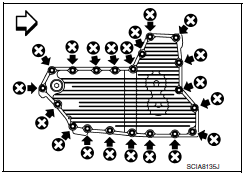
Remove oil pan bolts (
 ).
).-
 : Front
-
-
Remove oil pan.
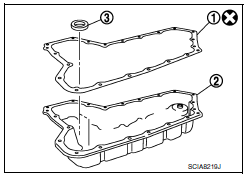
5. Remove oil pan gasket (1) from oil pan (2).
6. Remove magnet (3) from oil pan.
INSTALLATION Installation is in the reverse order of removal.
CAUTION:
-
Completely remove all moisture, oil and old gasket, etc. from the oil pan gasket mating surface of transaxle case and oil pan.
-
Do not reuse oil pan gasket, O-ring and oil pan bolts.
-
Apply CVT fluid to O-ring.
-
Install the oil pan assembly to the transaxle case with the following procedure.
-
Install the oil pan assembly to the transaxle case, and then temporarily tighten the oil pan bolts.
-
CAUTION:
Do not reuse oil pan bolts.
-
Tighten the oil pan bolts in a criss cross pattern to the specified torque.
-
Tighten the oil pan bolts again clockwise to the specified torque.
Inspection
Check foreign materials in oil pan to help determine causes of malfunction. If the CVT fluid is very dark, smells burned, or contains foreign particles, frictional material (clutches) may need replacement. A tacky film that will not wipe clean indicates varnish build up. Varnish can cause valves and clutches to stick and can inhibit pump pressure.
INSPECTION AFTER INSTALLATION
Check for CVT fluid leakage and check CVT fluid level. Refer to TM-155, "Inspection".
 Paddle shifter
Exploded View
Steering column assembly
Paddle shifter (shift-down)
Paddle shifter (shift-up)
Removal and Installation
REMOVAL
Park the ...
 Control valve
Exploded View
Transaxle assembly
Control valve
Snap ring
Collar
Manual plate
Lock nut
Lock nut
...
Other materials:
P0710 transmission fluid temperature sensor A
Description
The CVT fluid temperature sensor detects the CVT fluid temperature and sends
a signal to the TCM.
DTC Logic
DTC DETECTION LOGIC
DTC CONFIRMATION PROCEDURE
CAUTION: Always drive vehicle at a safe speed.
NOTE: Immediately after performing any "DTC CONFIRMATION
PROCEDURE", alway ...
B261A push-button ignition switch
Description
IPDM E/R transmits the push-button ignition switch status via CAN
communication to BCM. BCM receives
push-button ignition switch status by hardwire input. BCM compares the 2 signals
for mismatch.
DTC Logic
DTC DETECTION LOGIC
NOTE:
If DTC B261A is displayed with DTC U1000, ...
Condenser
CONDENSER
CONDENSER : Removal and Installation
REMOVAL
Discharge the refrigerant. Refer to HA-28, "Recycle Refrigerant".
Remove the RH hoodledge cover.
Remove the front bumper fascia. Refer to EXT-16, "Removal and
Installation".
Disconnect the high-pressure pipe from the condenser pip ...
Nissan Maxima Owners Manual
- Illustrated table of contents
- Safety-Seats, seat belts and supplemental restraint system
- Instruments and controls
- Pre-driving checks and adjustments
- Monitor, climate, audio, phone and voice recognition systems
- Starting and driving
- In case of emergency
- Appearance and care
- Do-it-yourself
- Maintenance and schedules
- Technical and consumer information
Nissan Maxima Service and Repair Manual

0.1036